Job Hunt Dashboard
Desktop / Productivity | 2026
A local-first job tracker that never leaves my machine.
A tool I built for myself while job-hunting in spring 2026. Electron 29 desktop app that lives in the Windows tray, polls Gmail on a schedule with read-only OAuth, and uses a pluggable AI provider (Gemini / Claude / OpenAI) to classify whether each new email is job-related. Everything is stored on my disk; nothing leaves except the Gmail OAuth call itself and, if I opt in, the email subject + snippet sent to one chosen LLM for classification.
Deliberately frameworkless: zero bundler, zero React, zero Tailwind. Storage is a JSON file in app.getPath('userData'). Gmail is the official googleapis SDK on a read-only scope. AI providers are reached over raw HTTPS without any vendor SDK so the surface is the same for all three. The wallpaper integration talks to the renderer over a local WebSocket on ws://127.0.0.1:49152.
The app I open every morning during the job search. Daily-task list and long-term goals are editable from inside the app, the dashboard mirrors live to a Wallpaper Engine background so the status is on screen even when the app is collapsed to tray.
Local-first, BYO-AI, even live on the desktop wallpaper.
Three properties are the point. It stays on disk, no server, no cloud, no telemetry. It's BYOK across three LLMs, Gemini, Anthropic, or OpenAI, switchable from Settings. It paints itself onto the wallpaper via a Wallpaper Engine plugin that listens on a localhost socket and re-renders whenever the app state changes.
gemini-2.0-flash, claude-haiku-4-5, gpt-4o-mini) live side-by-side in Settings. Keys are stored locally; switching providers is one dropdown change, no rebuild.wallpaper/wallpaper.html connects to the local WebSocket and renders the same daily tasks + deadline + sync status as the app. Check off a task on the wallpaper and it propagates back to the app instantly.A job search is the worst kind of long-running unindexed inbox.
Six months of applying to roles turns Gmail into a haystack, acknowledgments, recruiter outreach, scheduling threads, take-home assignments, and rejections all mixed in with everything else. Generic trackers (Huntr, Teal) want me to upload everything to their cloud. I wanted the opposite: an offline app on my own machine, plus the option to spend a few cents on an LLM call only when I explicitly choose to.
“How are people tracking 100+ applications without losing their minds?”
“Free tier limits at ~20 active applications; Pro tier $20-30/mo with cloud sync.”
“Request the narrowest scope that still works. Read-only Gmail is gmail.readonly, don't ask for write access if you only need to read.”
“Web wallpapers can run arbitrary HTML + JS and connect to local services, the perfect transport for a tray-app status widget.”
A productivity tool I'd actually trust with my Gmail.
Three increments that each made the next one possible.
Electron shell + manual inbox.
First milestone: a tray-resident Electron 29 app with a single HTML page, a JSON storage adapter, and a manual inbox where I could paste subject lines into application records. No Gmail integration, no AI. Useful enough to start the search, ugly enough to know it needed more.
Gmail sync + AI classification.
Added googleapis OAuth and a node-cron scheduler that polls Gmail every N minutes. Built a small provider abstraction so the sameclassify(subject, snippet) call dispatches to Gemini, Anthropic, or OpenAI based on the active provider in Settings. The job-related ones land tagged in the dashboard; the rest get ignored.
Wallpaper Engine live integration.
Stood up a local WebSocket server on ws://127.0.0.1:49152 inside the Electron main process. The Wallpaper Engine wallpaper is just an HTML page with a WebSocket client that subscribes to state updates from the renderer and pushes task-toggle events back. The result: my daily tasks and sync status are on screen even when the app is collapsed to the tray.
Electron's setLoginItemSettings happily registers the app for auto-launch, but openAsHidden alone doesn't hide it on first boot after install, Windows shows the window once. Fix was checking process.argv for the --hidden flag Windows passes on login starts and calling win.hide() if present. The first launch shows the window so you know it's installed; every subsequent boot opens it straight into the tray.
One process, three surfaces, one JSON file.
The Electron main process owns everything mutable, the JSON store, the cron timer, the OAuth tokens, the WebSocket server. The renderer process is the operator UI. The wallpaper is a passive listener over the local socket. All three see the same state because they all read from the same in-process source of truth.
// providers/index.js
const PROVIDERS = {
  gemini:    require('./gemini'),     // gemini-2.0-flash
  anthropic: require('./anthropic'),  // claude-haiku-4-5
  openai:    require('./openai'),     // gpt-4o-mini
}

// one shape, three implementations
async function classify(subject, snippet, cfg) {
  if (cfg.provider === 'none') {
    return { jobRelated: null, manual: true }
  }
  const p = PROVIDERS[cfg.provider]
  return await p.classify({
    subject, snippet,
    apiKey: cfg.keys[cfg.provider],
  })
}

// all three speak raw HTTPS, no SDKs, no auth helpers,
// no shared dependency surface between them.// main process
const wss = new WebSocketServer({
host: '127.0.0.1',
port: 49152,
})
wss.on('connection', (ws) => {
ws.send(JSON.stringify({
type: 'state', payload: store.snapshot()
}))
ws.on('message', (raw) => {
const m = JSON.parse(raw)
if (m.type === 'task.toggle') {
store.toggleTask(m.id)
broadcast({ type: 'state', payload: store.snapshot() })
}
})
})
// wallpaper/wallpaper.html
const ws = new WebSocket('ws://127.0.0.1:49152')
ws.onmessage = (e) => renderState(JSON.parse(e.data))
checkbox.onchange = () => ws.send(...)What it looks like every morning at 8am.
The desktop app is intentionally dense, stat cards across the top, today's objectives on the left, this-week progress + long-term goals on the right, all editable in-app. The Wallpaper Engine view is a slimmer read-mostly mirror of the same state, painted onto the desktop and kept in sync over the local WebSocket.
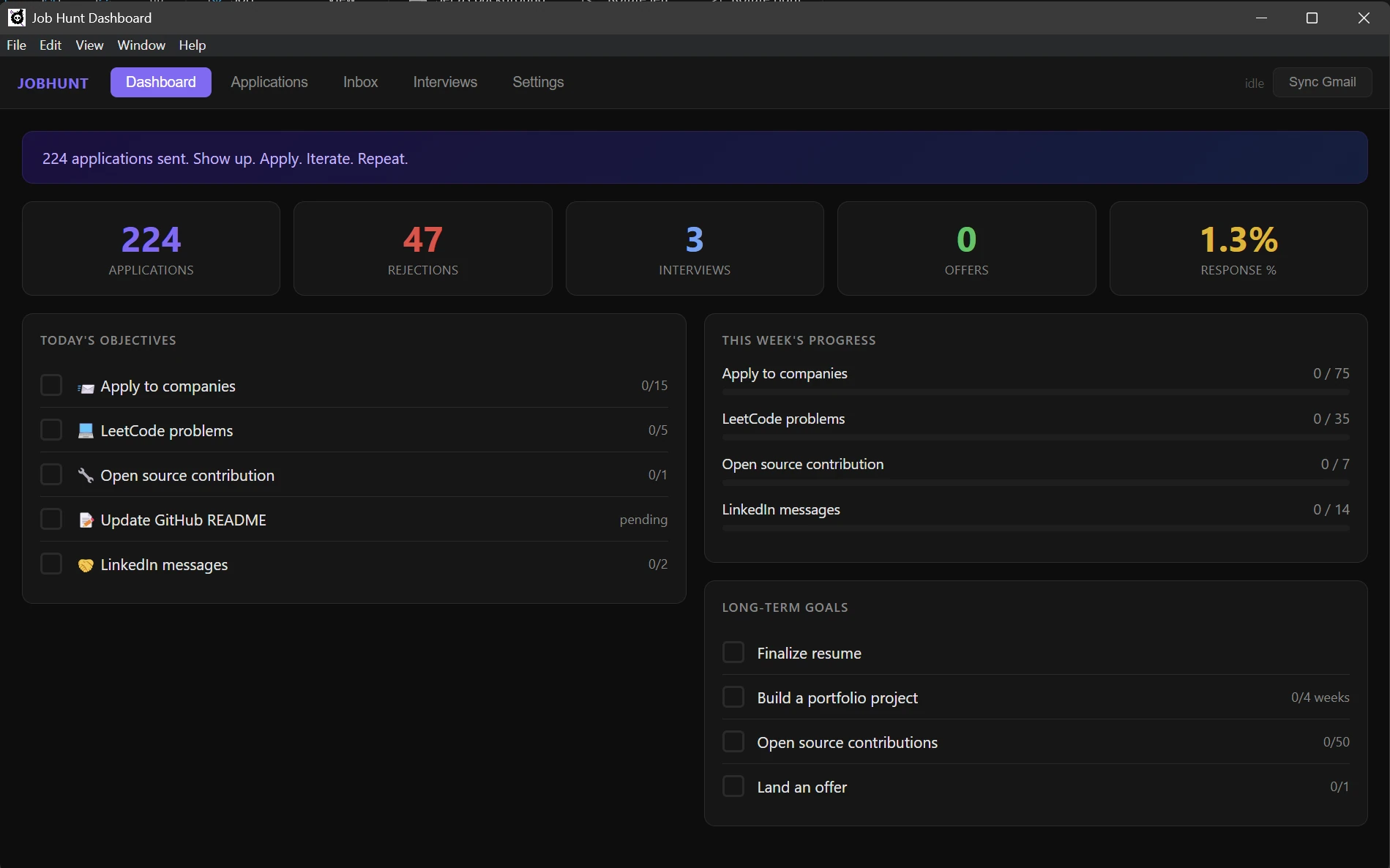
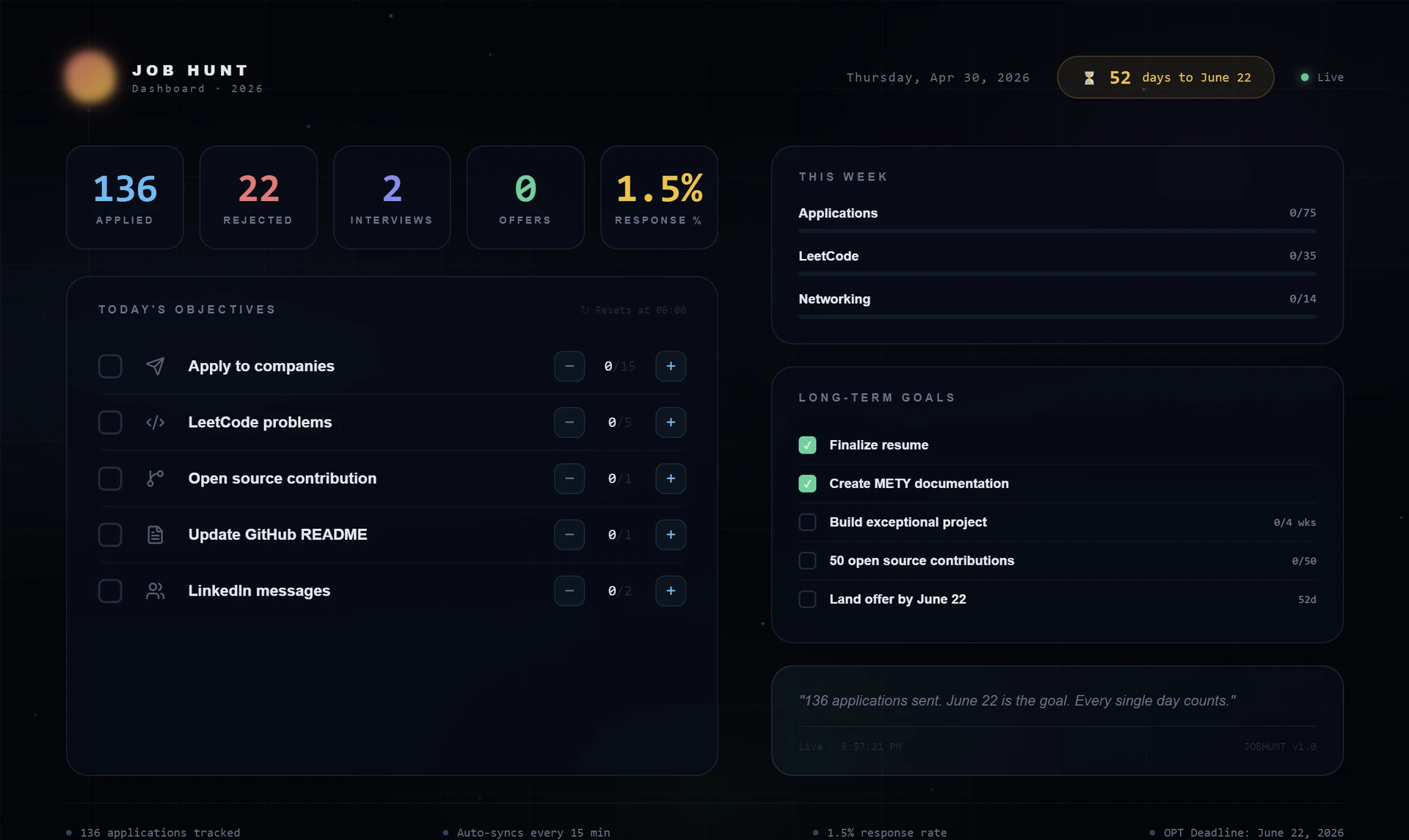
The same state, painted onto the desktop. A Wallpaper Engine “Web” wallpaper connects to the local WebSocket on 127.0.0.1:49152 and renders the stats, today's objectives, this-week targets, long-term goals, and the deadline countdown, all without focusing the app.
It's two-way: checking a task on the wallpaper marks it done in the app, and vice versa. Both surfaces read from the same in-process JSON store, so they never drift.
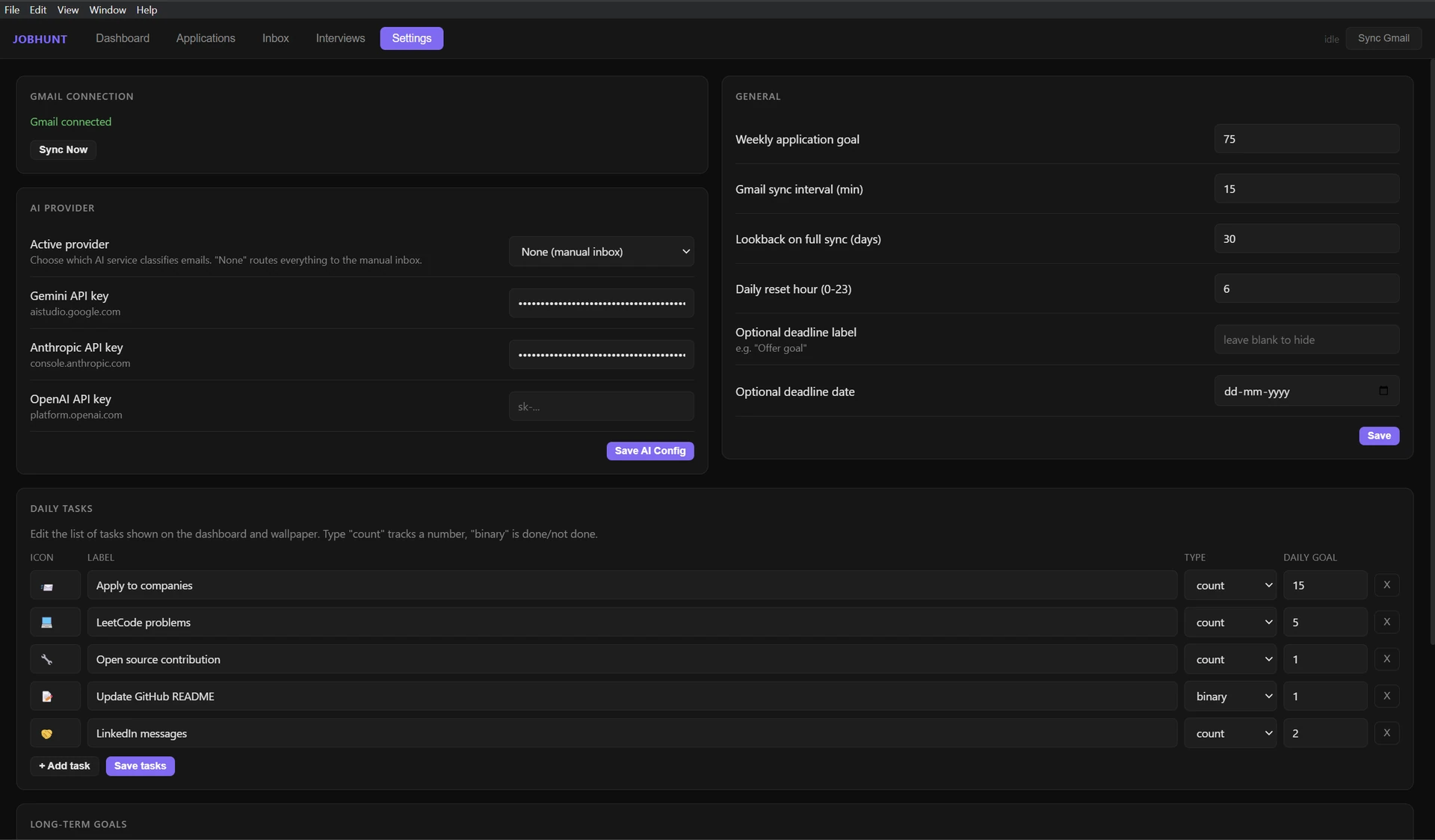
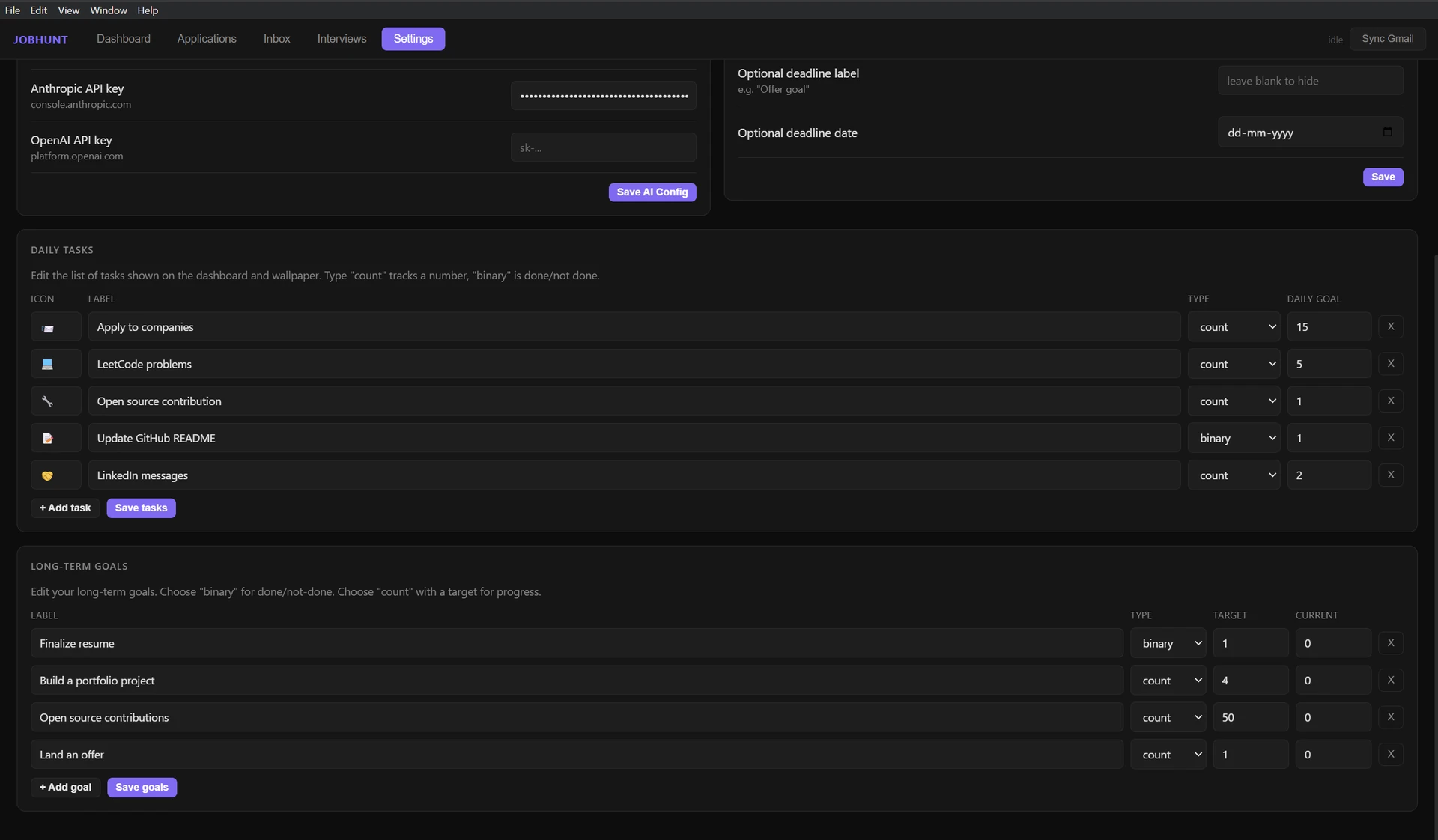
Local-only · no public URLJob Hunt is a desktop app, not a hosted site, it lives in the Windows tray and reads your Gmail locally. The screenshots above are from the running Electron build on developer hardware; daily tasks and goals are fully editable in Settings (count tasks track a number, binary tasks are done / not-done).